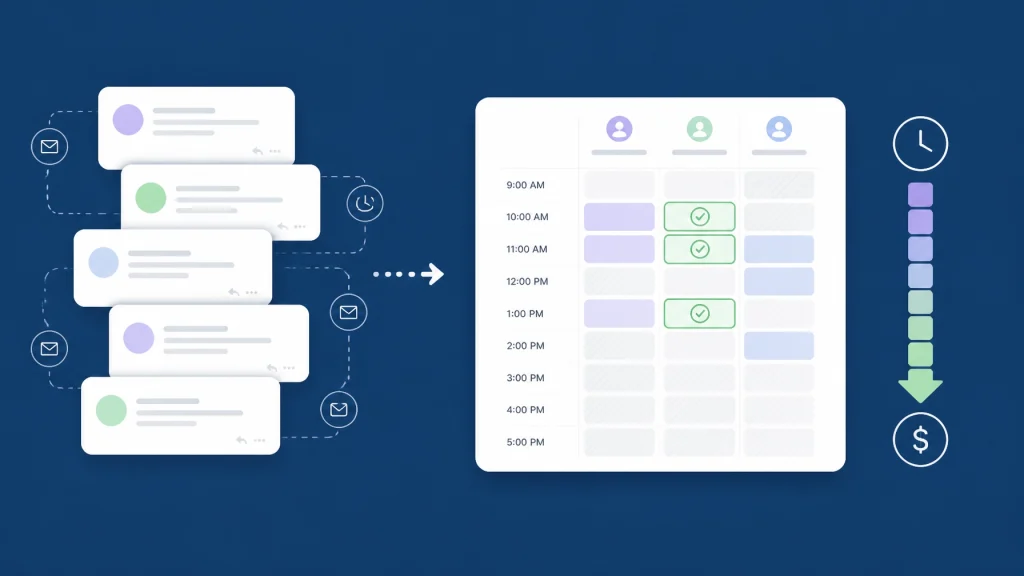
Meta description: “What time works for you?” creates hidden meeting coordination costs through email threads, time-zone confusion, and rescheduling. Learn how privacy-first cross-company scheduling reduces time spent scheduling meetings.
You ask a simple question: “What time works for you?”
Then the work begins.
Someone checks a calendar. Someone else converts the proposed time zone. A third person replies that Tuesday is unavailable after all. The meeting moves. Another participant loses the new invitation. The decision waits.
The question is short. The coordination cost is not.
For teams that regularly schedule meetings with clients, vendors, consultants, and partners, manual scheduling creates a measurable drain on productivity. It consumes employee time, delays decisions, increases rescheduling, and creates unnecessary friction between organizations.
The good news: you can replace the back-and-forth with one shared view of mutual availability.
The real cost starts before the meeting
A meeting has an obvious cost: the time every participant spends attending it.
The less visible cost is the labor required to get the meeting onto the calendar.
Research from Reclaim’s Smart Meetings Trends Report found that professionals spend an average of 3.0 hours per week managing meetings. That includes setting up meetings, negotiating times, handling calendar conflicts, and rescheduling.
Reclaim estimates that this represents 7.5% of total work time and approximately $5,914 per employee per year in meeting-management costs, based on its survey and cost model.
That figure is not a universal payroll calculation. It is an estimate based on survey data and assumptions about employee costs. But it makes the problem easy to see:
- A 10-person team could spend roughly 30 hours per week managing meetings.
- A 100-person team could spend roughly 300 hours per week on coordination.
- Every external meeting adds another opportunity for delays, confusion, and duplicated effort.
This is the hidden meeting coordination cost behind an apparently harmless question.
Manual scheduling creates five layers of work
The time is not lost in one large block. It disappears in small tasks that feel too minor to measure.
1. Email threads multiply
A group meeting often requires several proposed times, replies, corrections, and follow-ups.
Doodle’s scheduling research has reported that organizing a group meeting the traditional way can require approximately 30 emails and at least 30 minutes of organizer time. Its 2019 State of Meetings report analyzed 19 million meetings and surveyed about 6,500 professionals.
The problem is not only the number of messages. It is the lack of a reliable shared state.
Each person is working from a different view of availability. By the time everyone replies, the first option may no longer be open.
2. Time zones create avoidable errors
A 10:00 a.m. meeting in Chicago is not 10:00 a.m. everywhere.
When people work across regions, every proposed slot requires interpretation. Daylight saving changes add another source of confusion. A meeting that works for one office may fall outside working hours for another.
A time-zone mistake can lead to:
- Missed meetings.
- Late arrivals.
- Last-minute changes.
- Frustrated clients or vendors.
- Extra messages to confirm the correct time.
The larger the group, the more likely these errors become.

3. Calendar systems remain separate
Your team may use Google Calendar. Your vendor may use Outlook. An external consultant may use Apple Calendar.
Each calendar system can show availability well inside its own environment. The difficulty begins when you need to coordinate calendars across companies.
A standard internal calendar view rarely provides a complete free busy calendar across organizations. You may see your team’s schedules, but not the real-time availability of external participants.
That creates manual work:
- Ask the other organization for options.
- Compare those options with your calendar.
- Check internal participants.
- Convert the time zones.
- Send a proposed slot.
- Repeat when something changes.
This is why a traditional calendar is not always enough. You need a cross team calendar availability tool built for people who work beyond one company or domain.
4. Rescheduling creates a second coordination cycle
The first scheduling attempt is only part of the cost.
A participant may accept an invitation and later discover a conflict. A customer may request a change. A project deadline may move. Once the original slot is canceled, the entire process starts again.
Reclaim’s research found that professionals reschedule an average of 4.2 meetings per week due to a lack of mutual availability. The same report found that professionals average 17.1 meetings per week, with 3.5 meetings skipped, declined, or canceled.
These figures come from Reclaim’s survey of more than 1,300 professionals, so they should be read as survey findings rather than a universal benchmark. Still, the pattern is clear: scheduling conflicts are common, and each conflict creates more administrative work.
5. Decisions wait while calendars are compared
The most expensive result may not be the 30 minutes spent on email.
It may be the decision that does not happen.
A vendor cannot confirm the next project phase until the implementation team meets. A sales opportunity waits for a technical review. A partnership discussion stalls because four calendars do not align.
Scheduling friction slows the work that follows. It delays approvals, onboarding, negotiations, project milestones, and customer responses.
That is where calendar coordination productivity matters. The goal is not simply to book meetings faster. It is to keep business decisions moving.
External meetings need a different scheduling model
Internal scheduling is relatively manageable because one organization usually controls the calendars, permissions, and communication channels.
External scheduling is different.
You may need to schedule meetings with external clients without asking them to change tools. You may work with multiple vendors at once. You may coordinate people across departments, companies, and time zones.
This is the core challenge of cross company scheduling and multi company meeting scheduling:
- Participants use different calendar providers.
- Organizations have different sharing policies.
- External users cannot always view one another’s calendars.
- Full calendar details may be inappropriate to share.
- Availability can change while you are still comparing options.
A poll can help when participants are willing to select times manually. A booking link can help when one person is offering appointments.
But complex B2B scheduling often needs something more direct: real mutual availability across organizations, shown in one place.
See mutual availability without exposing calendar details
CalendarConnect is a calendar scheduling tool for finding meeting times across companies without requiring a calendar migration.
Create a project. Add participants from different organizations. Each participant authorizes their calendar once. CalendarConnect then shows mutual free and busy availability in one shared view.
You can use it to:
- Compare external participant calendar availability.
- Coordinate calendars across companies.
- Find open meeting slots across multiple time zones.
- See availability from Google, Outlook, and Apple calendars.
- Identify a time that works, then send the invitation through your existing calendar.
- Check recurring availability for meetings that happen more than once.
The privacy model is intentionally narrow. Participants share free/busy status: not meeting names, descriptions, attendees, or private calendar content.

That distinction matters when you are working with external partners. You need enough visibility to schedule efficiently, but not more access than necessary.
CalendarConnect is not a replacement for your existing calendar. It works with the tools you already use. There is no migration project and no need to ask every participant to adopt the same calendar platform.
Use one simple workflow
A more efficient scheduling process can be straightforward:
1. Create the project
Set up a scheduling project for the client, vendor, partner, or cross-company initiative.
2. Invite participants
Add people from each organization. Participants authorize their calendar once using Google, Outlook, or Apple.
3. Review mutual slots
CalendarConnect checks the connected calendars and displays overlapping availability across organizations and time zones.
4. Select a time and send the invite
Choose a time that works for everyone. Then send the actual calendar invitation through your existing Google, Outlook, or Apple Calendar, without manually comparing calendars across systems.

This is different from using an outlook google calendar availability checker that only helps within a narrow setup. The goal is broader: a shared view for cross-organization calendar coordination, regardless of which supported provider each participant uses. CalendarConnect identifies mutual free/busy availability across companies; the organizer sends the actual invitation after selecting a time.
Measure the cost before you automate it
You do not need a complex finance model to understand your scheduling burden.
Track these numbers for two weeks:
- How many external meetings does your team schedule?
- How many messages does each meeting require?
- How often does a meeting get rescheduled?
- How many people participate in the coordination?
- How long does it take to find a mutually available time?
- How many decisions wait for a meeting to be booked?
Then estimate:
Scheduling cost = coordination hours × loaded hourly employee cost
For example, if five people each spend 20 minutes coordinating one meeting, that meeting consumes 100 minutes of labor before it begins. Repeat that across multiple projects, vendors, and clients, and the cost becomes operationally meaningful.
The calculation also shows where a meeting scheduler app, business calendar software, or shared calendar software can produce value: by reducing the human work required to compare availability and resolve conflicts.
Stop asking the expensive question
“What time works for you?” sounds polite and collaborative.
In practice, it often transfers the scheduling work to everyone involved.
Replace the question with a shared answer:
Here are the mutual times that work for everyone. Select one.
That shift reduces email, limits time-zone confusion, protects calendar privacy, and helps teams move from coordination to action.
If your team works with external clients, vendors, or partners, CalendarConnect gives you a practical way to manage cross organization calendar coordination without changing your existing workflow.
Connect your calendars once. Find mutual availability in seconds. Send the meeting invitation from your existing calendar and keep the work moving.
Sources
- Reclaim.ai, Smart Meetings Trends Report
- Doodle, The State of Meetings 2019
- Doodle, Group Meeting Scheduling Best Practices
- Calendly, State of Scheduling Report
- CalendarConnect
Category: CalendarConnect