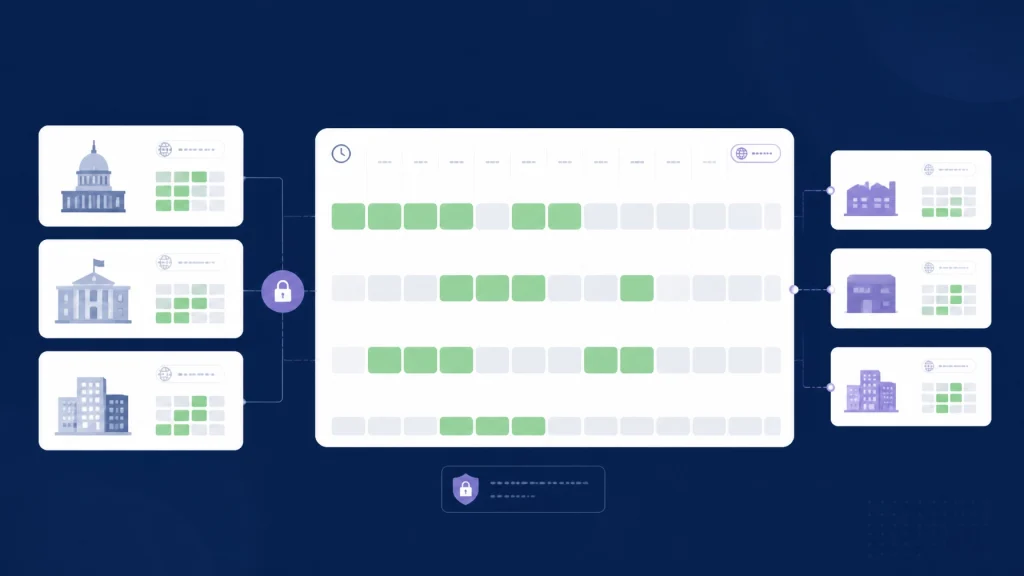
Government agencies can coordinate vendor briefings, procurement meetings, contractor reviews, and multi-agency calls without exposing sensitive calendar details. The practical approach is to share free/busy calendar availability across organizations, apply least-privilege access, account for time zones, and keep meeting records inside approved agency workflows.
You do not need to give external participants access to event titles, notes, attendees, or locations just to find a suitable time. You need a controlled way to see when everyone is available.
That distinction matters when you schedule meetings with external clients, contractors, suppliers, and partner agencies.
Start with the minimum information needed
A calendar often contains more than scheduling information. Event titles can reveal contract discussions, personnel matters, inspections, legal activity, security operations, or upcoming decisions. Locations and attendee lists may expose operational details that external participants do not need to know.
For most vendor or inter-agency scheduling tasks, the minimum useful information is simple:
- Available
- Busy
- Tentative or unavailable
- Working hours
- Time zone
- Preferred meeting duration
This is the foundation of cross organization calendar coordination. Participants can identify a mutual opening without opening the rest of their calendars.
The principle aligns with NIST’s definition of least privilege: allow only the access necessary to accomplish an assigned task. It is also consistent with CISA’s description of zero trust, which emphasizes precise, least-privilege access decisions for individual users, systems, and data.

Use free/busy access for vendor scheduling
A procurement officer may need to arrange a technical briefing with a contractor. A program manager may need a review with a supplier and two internal teams. An agency liaison may need to coordinate with another department and an external partner.
None of these situations necessarily requires full calendar access.
Google’s official Calendar API documentation describes its freebusy.query method as returning free/busy information for a set of calendars. The response provides busy time ranges rather than the content of each event.
Microsoft Graph offers a similar capability through its calendar: getSchedule method, which returns free/busy availability for users, distribution lists, or resources during a specified time period. Microsoft’s documentation identifies Calendars.ReadBasic as the least-privileged permission for that API in supported scenarios.
The operational benefit is clear:
Share the time signal, not the meeting content.
That can reduce accidental disclosure while giving schedulers the information they actually need.
Apply a clear access policy before inviting external participants
A scheduling tool does not replace your agency’s information-security or records-management policies. Before using any external scheduling workflow, confirm that it is permitted for the calendars and participants involved.
A practical review should answer five questions:
-
Who needs availability access?
Limit access to the people responsible for scheduling or participating in the meeting. -
What information is necessary?
Prefer free/busy status over event titles, descriptions, attendees, and locations. -
How long should access remain active?
Use project-based access where possible, and remove access when the work ends. -
Who approves external calendar connections?
Follow your agency’s identity, security, procurement, and third-party application review procedures. -
How will access be revoked?
Participants should be able to disconnect their calendar authorization through the approved account settings or workflow.
These controls support least-privilege access without making scheduling unnecessarily difficult.
Keep records awareness in the workflow
Meeting coordination and meeting documentation are not always the same thing.
An availability check may only identify open time. A meeting invitation may document official business. Meeting notes, agendas, recordings, chat messages, and decisions may create records that must be handled under an agency’s approved schedule.
The National Archives and Records Administration explains that federal records can be created on collaboration platforms, including platforms used to schedule meetings and work with other agencies, contractors, and external groups. NARA also advises agencies to involve records officers and establish responsibilities when multiple organizations collaborate.
That does not mean every scheduling interaction must be retained forever. It means your agency should determine what qualifies as a record and how it should be managed.
Before launching a recurring vendor or multi-agency scheduling process:
- Ask the agency records officer whether the workflow creates official records.
- Determine whether invitations, agendas, notes, or chats are substantive.
- Keep official documentation in approved agency systems.
- Clarify which agency owns records created in a shared collaboration environment.
- Confirm retention and export requirements before selecting a third-party platform.
Review the NARA Bulletin on managing records created on collaboration platforms and your agency’s own records-management policies. Do not assume that a scheduling platform’s retention settings satisfy your agency’s requirements.
Coordinate across agencies without making calendars public
Many public-sector meetings involve more than two organizations:
- A government agency and a construction contractor
- A procurement office and multiple bidders
- A state agency and a federal program office
- A city department, utility provider, and engineering consultant
- Several agencies coordinating an inspection or implementation review
Email-based scheduling becomes harder as participants and organizations increase. Each organization may use a different calendar system, sharing policy, working-hours standard, or time zone.
A shared free/busy view can simplify the process without creating a shared event-detail repository.
With CalendarConnect, each participant creates or joins a project and authorizes calendar access once. The platform then compares mutual availability across participating organizations. CalendarConnect is designed to show free/busy status without exposing event titles, notes, attendee lists, or other calendar content.
It supports connections to Google and Outlook, with Apple Calendar support available according to the account and product configuration. Participants continue using their existing calendars. No migration is required.
The result is a controlled free busy calendar across organizations rather than a request for everyone to open their full calendars.

Make time zones part of the scheduling decision
Time zones create avoidable errors in vendor and inter-agency scheduling.
A 10:00 a.m. meeting in Washington, D.C. may be 9:00 a.m. in Chicago and 7:00 a.m. in California. A contractor may work from another time zone. A recurring meeting can shift unexpectedly when daylight-saving rules change.
A reliable scheduling process should:
- Collect each participant’s calendar time zone.
- Display suggested slots in the viewer’s local time.
- Confirm the final time zone in the invitation.
- Avoid relying on abbreviations such as “CST,” which can be ambiguous.
- Recheck recurring meetings across future dates.
- Respect working hours and agency operating schedules.
CalendarConnect’s time-zone-aware availability view is designed to show mutual openings in each participant’s local time. This makes external participant calendar availability easier to interpret before you send the invitation.
For sensitive or high-impact meetings, confirm the final date and time in the invitation and meeting notice. A visual availability match is helpful, but the official invitation remains the source participants should follow.
Use a simple agency scheduling workflow
A repeatable process helps procurement teams, program offices, and administrative staff coordinate consistently.
1. Define the meeting purpose
Identify whether the meeting is a vendor briefing, procurement discussion, contractor review, technical session, or multi-agency coordination call.
Do not include sensitive details in an external scheduling request unless they are necessary and approved.
2. Select the required participants
Invite only the people whose availability is needed to find a workable slot. Add optional attendees after the core time is identified when appropriate.
3. Request availability-only authorization
Ask participants to connect their Google, Outlook, or supported Apple calendar through the approved workflow. Use the narrowest permission level that supports the scheduling task.
4. Compare mutual openings
Review the shared availability across organizations, working hours, and time zones. Select a slot that works for the required participants: not simply the first opening shown.
5. Send the official invitation
After you identify a mutual opening, the authorized organizer sends the actual invitation through their existing Google, Outlook, or Apple Calendar in accordance with agency policy. Include the approved meeting title, agenda, conferencing details, and any required records or security instructions in the agency’s normal calendar system.
6. Close or review access
After the project, procurement stage, or recurring meeting is complete, review whether external access should remain active. Revoke or remove access according to agency policy.

Coordinate faster without exposing more
Government agencies do not need to choose between efficient scheduling and responsible information handling.
You can coordinate vendor meetings, contractor briefings, procurement reviews, and multi-agency calls by sharing only what the scheduling task requires. Use least-privilege access. Keep event details private. Account for records responsibilities. Confirm time zones. Follow your agency’s policies for security, privacy, procurement, and records management.
CalendarConnect gives you one shared view of mutual availability across organizations while allowing participants to keep using Google, Outlook, or supported Apple calendars. Connect once, compare openings, and let the authorized organizer send the invitation from their existing calendar—without migrating calendars or starting another long email thread.
Start coordinating calendars across organizations with CalendarConnect