Category: CalendarConnect
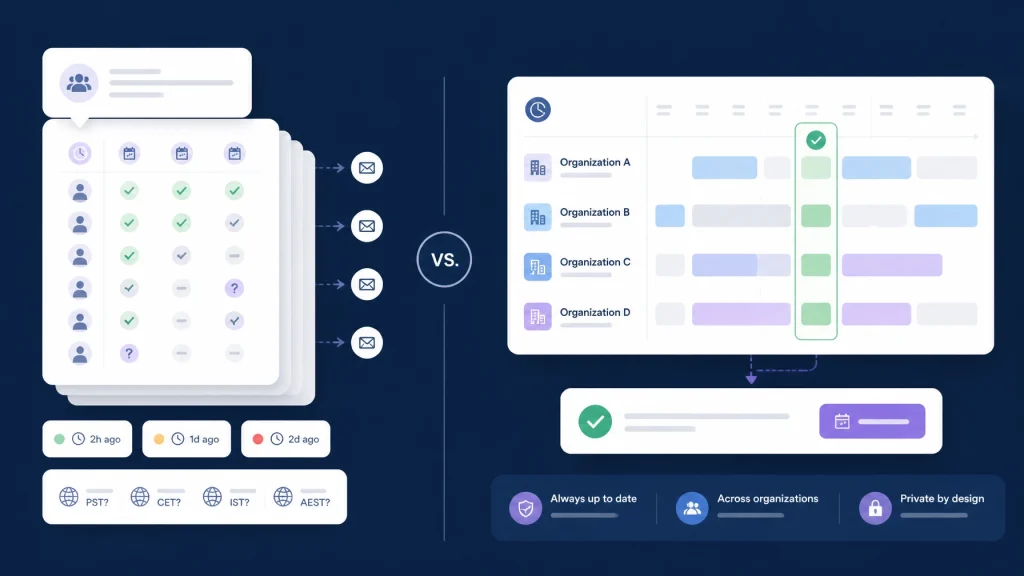
Doodle polls can help small groups choose a meeting time, but enterprise scheduling needs more than votes. Compare polls with a team scheduling tool that shows real mutual availability across companies, calendars, and time zones.
If you are coordinating a meeting with five coworkers, a poll can be practical. You suggest several times, participants mark what works, and you choose the option with the most support.
That workflow becomes harder when the meeting includes external clients, vendors, consultants, or partners.
Now you are managing multiple companies, different calendar systems, changing schedules, privacy requirements, and participants who may not respond at the same time. A simple poll can still collect preferences: but it does not necessarily show whether everyone is actually free when you are ready to book.
That distinction matters.
Polls work well for simple groups
Doodle’s official Group Polls documentation describes a straightforward process: create a set of time options, invite participants, track responses, and book the selected time.
For a small, familiar group, that can be enough.
Polls are useful when:
- You have a limited number of participants.
- Everyone already understands the proposed time zone.
- The meeting is a one-time event.
- Participants can quickly assess their own calendars.
- Privacy requirements are relatively simple.
- The organizer can follow up with people who have not responded.
Doodle also supports time-zone adjustments, reminders, deadlines, and calendar invitations depending on the product configuration. These features reduce some of the friction involved in coordinating a group.
The problem is not that polls are inherently bad. The problem is that enterprise scheduling creates a different set of requirements.
A poll asks people to report their availability. Enterprise scheduling often requires you to see current, permission-controlled availability across organizations and choose a workable time with less manual coordination before the organizer sends the actual invitation in their existing calendar.
Enterprise scheduling creates more work than voting can solve
A poll is a list of proposed options. It is not a live, shared availability layer.
That difference creates several practical limitations for cross company scheduling.
1. Every participant must do manual work
Participants must open the poll, interpret the proposed times, check their calendar, and mark their response.
That effort may be small for one meeting. It becomes repetitive when you schedule:
- Vendor implementation calls.
- Client discovery sessions.
- Partnership reviews.
- Procurement meetings.
- Project steering committees.
- Recurring meetings across multiple companies.
The organizer also has work to do. You may need to select realistic options, explain the time zone, remind late responders, compare partial responses, and confirm the final time.
A team scheduling tool reduces this participant effort by checking connected availability instead of asking everyone to manually vote on every option.
2. Responses can become stale
A poll captures responses at a particular point in time.
A participant may mark Tuesday at 2:00 PM as available, then accept another meeting before the organizer finalizes the result. Someone else may update their schedule, take time off, or become unavailable because a project changes.
This is a general limitation of response-based scheduling: not necessarily a defect in a particular poll product. The workflow depends on people updating their answers when their calendars change.
A shared calendar software approach works differently. It checks current free/busy data when the organizer looks for a slot. That does not remove every scheduling risk, but it reduces the gap between “this looked available earlier” and “this is available now.”
3. Rescheduling often means repeating the process
When a meeting is canceled or moved, a poll can become another coordination artifact to manage.
You may need to:
- Reopen the original poll.
- Add new time options.
- Ask participants to update their votes.
- Wait for people who responded previously.
- Confirm that the new result still works for everyone.
- Send another invitation.
That process is manageable for an occasional meeting. It becomes inefficient for project teams that reschedule frequently or maintain recurring meetings across companies.
CalendarConnect is designed to keep the focus on current mutual availability. Select a new date range, view the overlap, and choose another slot without restarting a long email thread.
4. Time-zone conversion is not the same as scheduling intelligence
Automatic time-zone conversion is helpful. Doodle documents that participants can see poll times adjusted to their local time zone.
But showing “3:00 PM” in a participant’s local time does not tell you whether that time falls within reasonable working hours for every organization.
A multi company meeting scheduling workflow may include participants in Chicago, London, Singapore, and Vancouver. The challenge is not only converting the time. It is finding a practical overlap and making the result clear to everyone.
You also need to account for daylight-saving changes. Time differences between regions are not always fixed throughout the year.
A dependable scheduling process should evaluate the selected meeting date and present each participant with the correct local time.
5. Poll visibility can create privacy questions
A poll shares declared preferences. Depending on the configuration, participants may see other people’s names, responses, or voting patterns.
That may be acceptable for a casual group. It may be less appropriate when scheduling involves:
- Executive calendars.
- Sensitive client work.
- Government vendors.
- Legal or financial discussions.
- Internal restructuring.
- Confidential project timelines.
Calendar platforms already provide different levels of access. Google Calendar supports “See only free/busy (hide details)” permissions, while Microsoft 365 supports external calendar sharing at free/busy levels. Apple also distinguishes between private calendar sharing and public read-only links in its iCloud calendar documentation.
For enterprise coordination, the key question is not simply “Can people vote?” It is:
Can participants share enough availability to schedule the meeting without exposing unnecessary calendar details?
What a team scheduling tool does differently

CalendarConnect is built for the space between companies.
Instead of asking every participant to evaluate a list of times, you create a project and add participants from any organization. Each person authorizes calendar access once. CalendarConnect then shows mutual free/busy availability across the group.
The workflow is simple:
- Create a project. Add participants by email, regardless of their company.
- Authorize calendars once. Each participant grants permission to share availability.
- View the overlap. See where everyone is free across organizations and time zones.
- Choose a time and send the invite from your calendar. Select a mutual slot, then send the actual meeting invitation through your existing Google, Outlook, or Apple Calendar.
CalendarConnect supports Google, Outlook, and Apple calendars without requiring a calendar migration or a new company-wide system. It identifies mutual free/busy availability across organizations. It does not automatically create calendar events or send invitations on your behalf.
The important privacy distinction is straightforward: participants share free/busy status, not the contents of their calendars. Event titles, descriptions, attendee lists, and notes remain private.

Polls versus shared availability
| Scheduling need | Poll workflow | CalendarConnect workflow |
|---|---|---|
| Finding a first set of options | Organizer proposes times | System identifies mutual slots |
| Participant effort | Each person checks and marks options | Each person authorizes once |
| Current availability | Depends on responses being updated | Uses connected free/busy availability |
| Cross-company scheduling | Participants coordinate through a shared poll | Organizations appear in one shared view |
| Privacy | Poll responses may be visible based on settings | Free/busy only; calendar details stay private |
| Time zones | Displays converted poll times | Shows mutual slots across time zones |
| Rescheduling | May require new options and follow-up | Check the updated overlap and select again |
| Sending the actual invite | Depends on the organizer or product workflow | Organizer sends the invitation from Google, Outlook, or Apple Calendar after choosing a time |
| Calendar systems | Depends on participant workflow and integrations | Google, Outlook, and Apple support without migration |
The comparison is not “polls are never useful.” Polls remain a reasonable option for simple, one-time group decisions.
The better question is whether a poll matches the complexity of your scheduling environment.
Research supports a careful approach to poll responses
A study titled “How Well Do Doodle Polls Do?” examines how group dynamics can affect the quality of poll-based scheduling outcomes.
The paper is theoretical rather than a broad real-world user study, so its findings should be interpreted carefully. Its central point is still useful: the quality of a poll depends on how accurately and strategically participants report their availability.
Someone may mark too many options to appear flexible. Another participant may mark too few to protect their time. Those responses can influence the selected outcome.
For small groups, this may be easy to manage. For enterprise scheduling, the more reliable approach is to reduce the need for subjective reporting in the first place.
Choose the right scheduling method for the job
Use a poll when:
- The group is small.
- The meeting is informal or one-time.
- The organizer can easily follow up.
- Everyone can confidently assess the options.
- The privacy requirements are limited.
Use shared calendar software when:
- Participants work for different organizations.
- You coordinate with vendors, clients, or partners.
- Calendars use different providers.
- Meetings involve several time zones.
- Availability changes frequently.
- You need free/busy visibility without sharing event details.
- Rescheduling is a normal part of the project.
The goal is not to add another complicated workflow. It is to remove unnecessary coordination.
CalendarConnect gives you one shared view of mutual availability across companies, with one-time authorization, privacy-first free/busy sharing, and no migration required.
You identify a time that works across organizations first. Then you send the actual invitation through your existing calendar.
Stop asking everyone to vote on times that may already be outdated. Connect your calendars with CalendarConnect and find the next meeting slot in seconds.