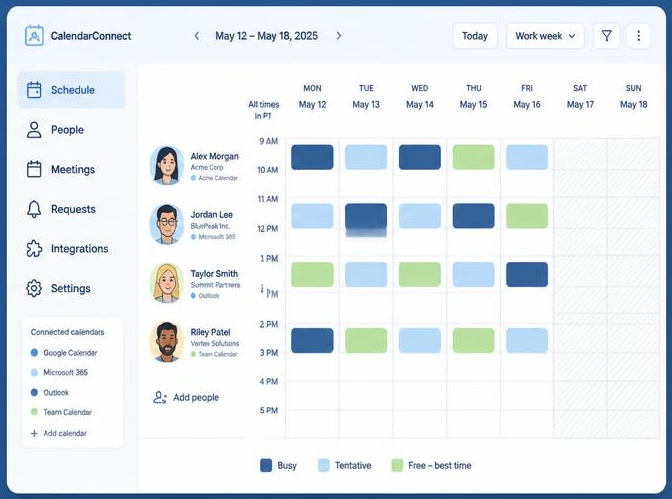
Free busy calendar sharing and cross organization calendar coordination make it easier to check external participant calendar availability fast—without exposing private details. See mutual open times across companies in one shared view and book faster.
When you schedule with people outside your company, the challenge is not finding a calendar. It is finding a time that works across several calendars without exposing private information.
Free busy calendar sharing solves that problem. Your partners see when you are available. They do not see what you are doing, who you are meeting, or why your calendar is blocked.
That distinction makes cross-company scheduling faster and safer.
CalendarConnect brings free/busy availability from different organizations into one shared view. Each participant authorizes access once. Everyone can then find mutual meeting times without long email threads or unnecessary calendar details.
Free/busy sharing shows availability: not calendar content
A full calendar share can expose more information than an external partner needs.
Depending on the permission level, a full-detail calendar share may reveal:
- Meeting titles
- Event descriptions
- Locations
- Attendee names
- Notes and attachments
- Customer, vendor, or project information
That level of access may be appropriate for a close internal team. It is rarely necessary when you are coordinating with an external vendor, client, or partner.
Free/busy sharing provides only the scheduling information required:
- Free: You can meet during the time slot.
- Busy: You already have something scheduled.
- Tentative: Your availability may need confirmation.
Partners see the time block. They do not see the event behind it.
Google Calendar describes this permission as “See only free/busy (hide details).” Microsoft 365 also supports sharing calendar availability with time only, without subjects or locations. You can review the official guidance from Google Calendar and Microsoft 365.
Privacy matters more when you work across companies
Internal scheduling often happens within a trusted organization. External scheduling is different.
You may be coordinating with:
- A prospective customer
- A legal or financial advisor
- A technology vendor
- A procurement partner
- A contractor or agency
- A joint-venture team
- A client in another time zone
These participants need your external participant calendar availability. They do not need access to your broader workday.
A busy block could represent a sales call, a private appointment, a confidential project review, or a personal commitment. The reason does not matter for scheduling. Only the availability status matters.
This is why privacy-first cross organization calendar coordination should minimize the information shared. Give external participants enough visibility to choose a time, but not enough access to inspect your calendar.

CalendarConnect keeps free/busy sharing limited
CalendarConnect is designed for the space between companies.
Each participant connects a calendar through a one-time authorization. CalendarConnect uses the permission needed to determine availability across the project. It does not need meeting titles, descriptions, attendee lists, or notes to identify an open time.
The result is straightforward:
Partners see when you are free. They never see what you are doing.
Participants can connect Google or Microsoft/Outlook calendars and keep using the systems they already rely on. There is no calendar migration and no requirement to move your team into a new business calendar software platform.
Apple Calendar support is listed as coming soon. Participants can also revoke access through their Google or Microsoft account settings.
One shared view replaces scattered coordination
Traditional scheduling across organizations often looks like this:
- Ask everyone for availability.
- Receive several partial answers.
- Suggest a few times.
- Discover a conflict.
- Convert time zones manually.
- Repeat the process.
This is slow because each person is working from a different view.
CalendarConnect creates a free busy calendar across organizations. The system overlays participant availability and highlights the time slots that work for everyone.
You can use it to:
- Find meeting times across companies
- Coordinate calendars across companies
- Schedule meetings with external clients
- Compare availability across vendors and partners
- Manage multi company meeting scheduling
- Reduce back-and-forth between project teams
Instead of asking, “What time works for you?” you can identify mutual openings directly.
Cross-company scheduling works in four steps
1. Create a project
Start a scheduling project and add participants by email. Add people from different companies, departments, and calendar systems.
You do not need to create accounts for every organization. The project simply identifies who needs to participate.
2. Invite participants to authorize access
Each participant receives an invitation to connect their calendar. They authorize free/busy access one time.
No one needs to forward calendar exports or send screenshots. No one needs to share their entire calendar with an external company.
3. Review mutual availability
CalendarConnect combines each participant’s availability in one view. Mutual openings are clearly identified, including availability across time zones.
You can see whether a slot works for everyone before suggesting it.
4. Select and book the meeting
Choose an available slot and send the invitation. CalendarConnect works with the calendars participants already use, so there is no migration or separate scheduling workflow to maintain.
The process replaces a long email thread with one clear action.
Free/busy is safer than full-detail calendar sharing
The difference between these two sharing models is simple.
| Full calendar details | Free/busy only |
|---|---|
| May show event titles | Shows only the availability state |
| May show locations | Hides locations |
| May show attendee names | Hides attendee lists |
| May show notes and descriptions | Hides event content |
| Gives more information than scheduling requires | Shares only what scheduling requires |
For internal collaboration, full details can help teams understand context. For external coordination, that context can create unnecessary exposure.
Free/busy sharing applies the principle of minimum necessary access. External partners get a useful scheduling signal without receiving the rest of your calendar.
You can still share the details of a specific meeting when you invite someone to that meeting. Free/busy protection applies to the rest of your calendar.
Use the right tool for external availability
A standard calendar scheduling tool may help one person create a booking page. A meeting scheduler app may offer appointment links for internal or customer-facing use.
Those tools can be useful, but they do not always solve multi-party scheduling across separate organizations.
A team may need a shared calendar software experience that shows availability across companies: not just one person’s booking preferences. A project manager may need a team scheduling tool that includes vendors, clients, and consultants without giving everyone full calendar access.
CalendarConnect focuses on that specific need: cross-company availability with privacy-first permissions.
If you are searching for an outlook google calendar availability checker, the key question is not only whether the systems connect. It is also what information the tool exposes after they connect.
A reliable cross-team solution should answer both questions:
- Can it find availability across calendar systems?
- Can it do so without exposing event details?
Privacy controls should be clear and reversible
A scheduling platform should make permissions easy to understand.
With CalendarConnect:
- Participants authorize access themselves.
- Access is limited to free/busy availability.
- Event titles, notes, locations, and attendee lists remain private.
- Participants continue using their existing calendars.
- Participants can revoke access from their calendar provider.
- No migration is required.
This approach gives each person control over their own calendar. It also gives organizations a practical way to manage cross team calendar availability without creating broad access between companies.
Privacy should not be a hidden setting. It should be the default behavior of the scheduling workflow.

Make cross-organization coordination easier to trust
External partners are more likely to participate when the request is clear.
“Connect your calendar so we can see your free/busy availability” is easier to understand than “Share your calendar with our organization.”
The first request is limited and specific. It explains what the participant is authorizing and what they are not sharing.
That clarity matters when you work with customers, vendors, and partners who have their own security policies. It also reduces the hesitation that often delays a meeting before scheduling even begins.
Good free busy calendar sharing does not ask people to trust a vague permission. It gives them a narrow, useful connection they can control.
Find mutual time without exposing private details
Scheduling across companies should not require everyone to reveal their calendars.
With privacy-first availability sharing, you can:
- Create one project for all participants.
- Connect calendars from different organizations.
- Check external participant calendar availability.
- Find mutual openings across time zones.
- Invite participants without sharing full calendar details.
- Book the meeting through existing calendar systems.
That is the practical value of cross organization calendar coordination. You get visibility where you need it: the overlap between schedules. Your partners keep privacy everywhere else.
Start connecting calendars with CalendarConnect and replace scattered coordination with one shared, privacy-first view.